
ChordPro is a well established format for writing songs with chords. It uses square brackets to indicate chords, e.g. [Am], and supports a number of instructions for indicating sections, comments, etc.
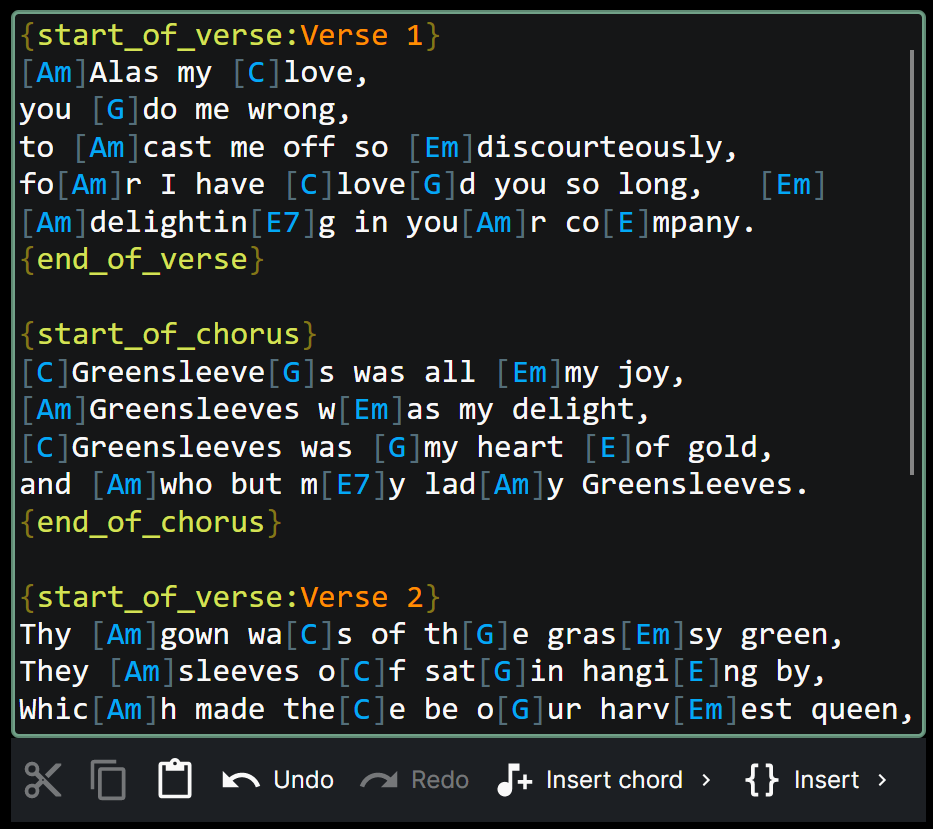
Chords can be moved around by tapping on the chord and using the drag handle to move it to the desired position:
Using the ChordPro insertion tools
The ChordPro editor includes a number of tools to make it easier to insert ChordPro directives and chords. These are available in the toolbar at the bottom of the screen.
First up is the chord insertion tool:
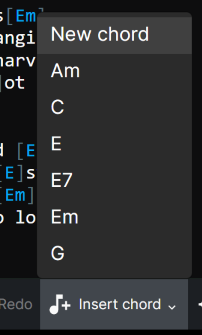
It will list all the chords that are currently in the song, so you can quickly select one to insert. You can also just insert an empty chord and then edit the chord name to get the chord you want.
Keyboard & mouse Press CTRL+SHIFT+C to open the chord insertion tool, then arrow keys and Enter to select a chord.
The ChordPro directive insertion tool works in a similar way:
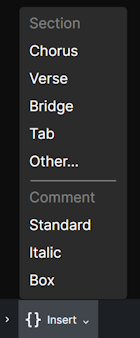
If you select a section directive while a block of text is selected, the directive will be applied to that block of text. For example, if you select Chorus, the block of text will be wrapped in {start_of_chorus} and {end_of_chorus} directives.
Keyboard & mouse Press CTRL+SHIFT+I to open the ChordPro directive insertion tool, then arrow keys and Enter to select a directive.
Supported ChordPro formatting directives
Chordle supports a comprehensive set of ChordPro directives, including standard ChordPro format directives and Chordle-specific extensions. Unknown directives are preserved during editing but ignored during song display.
Section Markers
Verses:
{start_of_verse}or{sov}- Marks the beginning of a verse section{end_of_verse}or{eov}- Marks the end of a verse section{sov:Verse 1}- Optionally include a custom verse title
Chorus:
{start_of_chorus}or{soc}- Marks the beginning of a chorus section{end_of_chorus}or{eoc}- Marks the end of a chorus section{soc:Chorus Repeat}- Optionally include a custom chorus title{chorus}- Repeats the previously defined chorus without re-declaring it
Other Sections:
{start_of_bridge}or{sob}- Marks the beginning of a bridge section{end_of_bridge}or{eob}- Marks the end of a bridge section{start_of_{X}}e.g.{start_of_instrumental}or{start_of_intro}- Marks the beginning of a custom section with an optional title{start_of_tab}or{sot}- Marks the beginning of guitar tablature{end_of_tab}or{eot}- Marks the end of tablature. See Tablature{start_of_grid}or{sog}- Marks the beginning of a chord grid{end_of_grid}or{eog}- Marks the end of a chord grid. See Chord grids{start_of_part:Part Name}or{sop:Part Name}- Marks a named custom section{end_of_part}or{eop}- Marks the end of a custom section
Section titles
Any section start directive can carry a title, which is shown as the section’s heading. You can write it either as plain text after the colon, or using the ChordPro label attribute:
{start_of_verse: Verse 1}- a plain title{start_of_verse: label="Verse 1"}- the same title, written as a label{start_of_tab: label="Intro"}- a titled block of tablature{start_of_grid: label="Outro" shape="1+4x2+1"}- a titled chord grid with a shape. Only the label is used as the heading
Both forms work for every section type, so songs written for other ChordPro apps keep their headings when you open them in Chordle.
Comments
{comment: Your comment}or{c: Your comment}- Adds a comment line (displayed normally){comment_italic: Your comment}or{ci: Your comment}- Adds an italicized comment{comment_box: Your comment}or{cb: Your comment}- Adds a boxed comment
Comment macros
Comment text can include dynamic macros that are replaced with song metadata when the song is displayed. Macros use the syntax %{TOKEN}:
| Macro | Replaced with |
|---|---|
%{title} |
Song title |
%{subtitle} |
Alternative title |
%{artist} |
Artist name |
%{copyright} |
Copyright text |
%{tempo} |
Tempo (BPM) |
%{capo} |
Capo position |
%{key} |
Song key |
For example, {comment: Key: %{key} - Capo: %{capo}} will display the current key and capo position when the song is shown.
Other Directives
Any directive not recognized or currently used by Chordle is treated as a custom or unknown directive. These directives are preserved in the source text during editing and storage, but will not affect the visual display or playback of the song. This allows you to store custom metadata or directives for use by other tools while keeping them in your Chordle song files.
Example: {custom_directive: some value} will be preserved but ignored by Chordle.
Chordle-Specific Extensions
When exporting, Chordle extends the ChordPro standard with the following custom directives:
Song Identification and Metadata:
{x_chordle_id: xxxxxxxx-xxxx-xxxx-xxxx-xxxxxxxxxxxx}- Unique song identifier (UUID){x_chordle_date_added: 2026-04-21T12:00:00Z}- Date the song was added to your library (ISO 8601){x_chordle_date_modified: 2026-04-23T14:30:00Z}- Date the song was last modified (ISO 8601){x_chordle_tags: tag1, tag2, tag3}- Comma-separated list of song tags{x_chordle_weblink: https://example.com}- Web link for the song source
Chord and Notation Settings:
{x_chordle_notation: Standard|German|Latin|Nashville}- Sets the chord notation system{x_chordle_instrument_chords: Guitar {list of fingerings}}- Defines custom chord fingerings for instruments{x_chordle_preferred_instrument: xxxxxxxx-xxxx-xxxx-xxxx-xxxxxxxxxxxx}- The ID of the instrument to show chord diagrams for{x_chordle_instrument: xxxxxxxx-xxxx-xxxx-xxxx-xxxxxxxxxxxx|D A D G A D|DADGAD}- Defines one of your own instruments: its ID, its tuning from lowest to highest string, and its name, separated by|. Chordle writes this when the song’s preferred instrument is one you created, so the instrument is added automatically when the song is imported or synced to another device
Playback and Display:
{x_chordle_default_time: 4/4}- Default time signature for the song{x_chordle_scroll_speed: 0.5}- Sets autoscroll speed (0.0 to 1.0)
Section Control:
{x_chordle_repeat_section: Verse 1}- Repeats a named section without re-declaring it