
4 October 2026 (3.2610.10400)
Song presentation
-
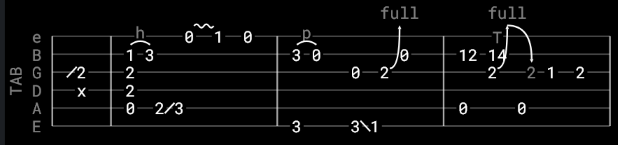
New: Tablature display has had a complete rewrite, resulting in much improved readability
-
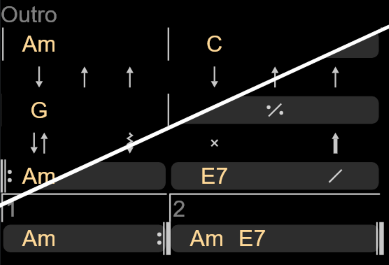
New: Grid notation is also completely reworked, with the option to display it in a flat format or as blocks of chords
-
New: Color theme setting for Grid notation
-
Fixed: Changing song presentation settings such as Lyrics only while a song was playing didn’t always update the song until you switched to another one
Song editor
- New: Chords above text formatting now recognizes [Grid] and [Tab] as valid section headers for grid notation and tablature
- Fixed: Transposing a song now also transposes the chords in grid notation and the chord names above tablature
Word export
- New: Grid notation and tablature now export to Word as pictures that match how they look in Chordle, in the exported key and sized to fit the page. Turn off Draw grids and tablature as pictures in the export options to keep them as editable text
- Updated: Grid notation and tablature are left out of Word exports when chords are turned off, matching Lyrics only mode
1 October 2026 (3.2610.10100)
Syncing
- Updated: OneDrive syncing now uses a more modern sign-in experience. This may require you to approve the first sign-in attempt after updating to this version.
Web searching
- Fixed: e-chords searching
Exporting
- Fixed: A Word export error could occur when exporting songs containing special characters
27 September 2026 (3.2609.12700)
Exporting
- Fixed: Exporting to PDF/Printing transposed songs didn’t always render the correct chord diagrams
- Fixed: Exporting to Word wasn’t respecting capoed chords
General
- Updated: Added a transition animation when expanding/collapsing the library when playing a song
- Updated: Improved the contrast of the ‘start set list from here’ button in the set list preview
- Updated: Made web searching more resilient to temporary network issues
21 September 2026 (3.2609.12100)
Visual Metronome
- Updated: Decreased CPU usage
- Updated: Changed the default color of the visual metronome to be more visible on light backgrounds
19 September 2026 (3.2609.11900)
General
- Fixed: A crash could occur when bulk-tagging large numbers of songs
15 September 2026 (3.2609.11500)
Set list player
- New: Added a new Randomly option to Manage/Sort set list songs to randomize the order of songs in a set list
10 September 2026 (3.2609.11000)
General
- New: It’s now possible to change the title of a set list in the preview pane without having to enter set list editing mode
- Fixed: A crash that could occur when deleting multiple songs from the song library while the song is being played
2 September 2026 (3.2609.10200)
Word importing
- Updated: Improved chord alignment when importing songs from Word documents
Song editing
- New: Added a ‘Paste and Realign Chords’ command that will realign chords when pasting from external sources that don’t use fixed width fonts (e.g., Word)
General
- Fixed: Connecting a bluetooth footswitch would sometimes cause app navigation to get stuck (Android)
- Fixed: Switching between set list songs in a narrow window or phone view no longer returns you to the library page
- Updated: It’s now possible to go ‘fullscreen’ even when in floating/docked mode on Android, taking up all available space in the window (Android)
- Updated: Improved the messaging shown after signing into a cloud storage provider
27 August 2026 (3.2608.12700)
General
- Fixed: Editing a song in full screen mode no longer exits full screen mode when you save
26 August 2026 (3.2608.12600)
General
- New: You can adjust the density of the text in the song and set list libraries. Dense reduces the font and padding, Sparse increases them. Normal is the default setting.
- Updated: Renamed the Double-tap set list options to Open for editing and Start the set list to better align with the options in the set list library toolbar.
16 August 2026 (3.2608.10200)
General
- Updated: Application icon updated to assist with accessibility and visibility (Windows)
- Updated: Using a bluetooth pedal after turning it on and off no longer causes songs to be skipped when switching between songs (Android)
- Updated: Reduced application startup time when working offline (Windows)
16 July 2026 (3.2607.11600)
Playing songs
- Changed: Playing a song no longer takes over your whole screen until you explicitly press the full screen button. The song still fills the window and the library gets out of the way, but Chordle now stays in its window so you can see your other apps alongside it. If you preferred the old behavior, turn on Take over the screen when playing in the Interface settings.
- Updated: Clearer wording for the ‘Always hide the library when playing’ setting.
13 July 2026 (3.2607.11300)
Syncing
- Fix: A crash could occur when cancelling setup of OneDrive sync
Metronome
- Fix: On some systems, other apps could be blocked from playing audio while Chordle was open. The audio device is now only held while the audible metronome is playing.
General
- Updated the application logo
9 July 2026 (3.2607.10900)
General
- Fix: A rare crash that could occur when opening a menu
5 July 2026 (3.2607.10500)
Reworked playing experience
This update changes how playing a song fits into the rest of Chordle. Until now, playing a song took you away to a separate player screen. Now, when you play a song, it opens in the pane next to your library so you can keep browsing, searching and building set lists while it plays.
Your currently playing set list can now be docked wherever suits you - along the bottom with the player controls as before, or down the left or right so it stays beside your library. This can be configured in the Interface settings as well as changed using the Manage button while playing.
Metronome
- New: Added an ‘Only play audio in full screen’ setting so the audio metronome stays silent when a song is shown alongside the library and only plays once you go full screen.
General
- New: A dedicated back button appears in the window title bar on Windows when navigating the app.
4 July 2026 (3.2607.10400)
Cloud Sync
- New: When the sync folders are manually deleted from cloud storage, a nicer error message is displayed with the option to re-initialize syncing
20 June 2026 (3.2606.12000)
General
- New: Libraries now have a dedicated button in the toolbar to toggle multi-select mode
- New: Added a link to the full release notes in the help section on the settings page
17 June 2026 (3.2606.11700)
Word export
- Fix: Chord annotations are now exported correctly
14 June 2026 (3.2606.11400)
Metronome
- New: Added an audible metronome. You can turn this on in the Metronome settings, configure the beat sounds and volume, and quickly turn it on and off with a hotkey.
Song player
- New: Added support for quick access hotkey buttons in the song player. These can be configured in the new Song hotkey buttons settings and can be set to any action available as a hotkey.
- New: Added a hotkey to edit the current song
- New: Added a hotkey to toggle visibility of chord diagrams
Exporting to PDF
- Updated: Reduced the file size of exported PDFs
General
- Splitters between panes are now more obvious and slightly wider, making it easier to resize panes on touch devices
- Fix: A crash that could occur when bulk tagging songs
- Fix: Extending selections in the song editor with touch now works correctly
8 June 2026 (3.2606.10800)
Song library
- Fix: A crash could occur when changing the name of an artist for a song or removing the last reference to a tag
6 June 2026 (3.2606.10600)
Song player
- Fix: The song player no longer resets scrolling a few seconds after changing the scroll speed
- New: Added an option to use double-tap to switch songs instead of swiping or tapping
- Updated: The mini song library now has its own close button, making it more obvious how to close it after opening it for the first time
5 June 2026 (3.2606.10500)
Song player
- New: Mini song library is now resizable
- New: Mini song library state is now remembered between songs and sessions
Song library
- Fix: Fixed a crash that could occur when deleting a song that was currently being played
Set list library
- Fix: Copying a set list that contains the same song multiple times now works correctly
Web searching
- Fix: Search results are no longer ordered by artist, meaning that the order of results is more consistent with the search engine’s own ordering of results
31 May 2026 (3.2605.13100)
Word exporting
- Fix: Sections without titles now export correctly
Song player
- New: Added a mini song library that can be opened while playing a song. This allows you to scan your song library for other songs without having to leave the currently playing song. This is enabled by default, but can be turned off in the Interface settings.
- Fix: ‘Repeat section’ markers are always rendered in songs, even if section headers themselves are turned off in Song Presentation settings
Song editor
- Fix: Chords now align and drag correctly in songs written in scripts that use combining characters (Thai, Arabic, etc.)
- New: When editing a song using Chords Over Text, a warning will now be shown when combining characters/non-monospace fonts are present in a song as these can lead to inaccurate space measurements when positioning chords
Annotations
- Fix: The outline of pen color selectors is now more distinct when the UI has the light theme applied
29 May 2026 (3.2605.12900)
Song presentation
- Fix: Nashville Number System now correctly numbers chords in minor keys relative to the relative major (e.g. Em in the key of Em is now shown as ‘6m’, not ‘1m’)
Sharing
- Fix: Improved reliability of sharing from Chordle
28 May 2026 (3.2605.12800)
Song presentation
- Added hot key settings to control whether scrolling past the start/end of a song should also change songs
- Fix: You can now manually scroll a song while auto-scrolling is on
Word export
- Added an option to export songs as multiple files in a zip
- Fix: Set lists exported to Word weren’t always exported in the correct song order
24 May 2026 (3.2605.12400)
Song library
- Added the option to sort and group by tags
Cloud syncing
- Fixed: OneDrive sign-in failed with ‘This site can’t be reached’
Song presentation
- Added a new ‘Move chords’ option for chord overlap handling: instead of hyphenating words, chords drift right to avoid overlapping while lyrics stay in place
- Fixed join lines appearing mid-word in Thai and CJK scripts
19 May 2026 (3.2605.11900)
Fixes
- Potential crash when migrating old Chordle libraries
- Duplicated songs in set lists should no longer cause issues
General
- Added License section to the settings pane
18 May 2026 (3.2605.11800)
General
- Added support for Nashville Numbering System notation
- Added printing support for set lists and songs
17 May 2026 (3.2605.11700)
General
- Fixed a crash that could occur at startup on some slower devices
- Updated the new release notification system so it’s not so intrusive
16 May 2026 (3.2605.11600)
Set list player
- The menu for managing the open song/set list has been labelled to make it more obvious
- Added a new menu option to sort set list songs by key
- Fixed a bug where the delete button wouldn’t always work for songs in the set list
General
- Fixed a bug where full screen mode would get left on if you dragged Chordle by the title bar while in full screen mode
15 May 2026 (3.2605.11500)
Song presentation
- You can now style Chord Annotation text differently to Chord text
- Added support for optional (bracketed) chords
- Improved ChordPro/Chords Over Text round-tripping of bracketed chord modifiers
- Fixed spacing between chords being lost when the chord line is longer than the text line
- Better preservation of spaces between chords in chord-only lines
External monitor support
- Added an option to hide just notes when replicating your display. Lyrics only mode will always hide notes.
13 May 2026 (3.2605.11300)
- Added a new option to the song player menu to open the current song in Microsoft Word or PDF. This allows you to quickly print off a song in whatever transposed state it’s currently in.
10 May 2026 (3.2605.11000)
- Improved song library searching
- Updated syncing pane to show the remaining number of actions
9 May 2026 (3.2605.10900)
Set list library
- Playing a set list starting from a specific song is now more accessible. As well as double-clicking on a song, selecting the song reveals a ‘play’ button that can be used.
Set list player
- It’s now more obvious that the set list player can be expanded and collapsed
- The expanded size of the set list player is now remembered between sessions
Syncing
- Clearer messaging when syncing is disabled due to no internet connection
Web searching
- Searching is now prevented when there is no internet connection detected, with clearer messaging about why
- Fixed EChords searching
Song editor
- New songs are always created with your preferred notation kind (Standard, German, Latin)
8 May 2026 (3.2605.10800)
- Fixed a crash that could occur after deleting the first song in a set list
- Fixed an issue where chord diagrams weren’t showing the transposed chords for songs
7 May 2026 (3.2605.10700)
External monitor support
- The present button is now only shown when more than one screen is connected
- If Chordle is on the secondary screen when you start presenting, it will automatically move to the primary screen
- Press Escape on the presentation window to stop presenting
- Added a new setting to override the font size used on the presentation screen
Web search
- Improved handling of web searches that return no results
5 May 2026 (3.2605.10500)
General
- Added a new troubleshooting option to re-import library data preserved as part of an upgrade
Song editor
- Updated the way that the key is selected for the song, adding an option to not transpose the chords in the editor when changing key. Helpful for when the key and song chords have got out of sync.
4 May 2026 (3.2605.10400)
- Fixed an issue where it wasn’t always possible to tap on the current song in the set list to get back to playing it
- Added support for showing the current song on an external monitor as just the lyrics or a mirroring of the main display. Disabled by default, it can be turned on in the settings pane.
3 May 2026 (3.2605.10300)
- Using foot switches to change songs no longer causes buttons in the UI to get unintentionally focused
- When playing in full screen, tapping anywhere at the bottom of the screen will now reveal the player controls
2 May 2026 (3.2605.10200)
- You can now add annotations to songs and set lists. Annotations are a great way to add extra information to your songs and set lists, such as performance notes, reminders, or any other information you want to keep track of.
- Fixed an issue with paginated layout where it wasn’t always possible to swipe to the next page of a song
- Updated Google Drive authentication again - hopefully this will squash the last of the issues that caused you to have to re-authenticate frequently. (You might need to do it one last time after updating to this version)
28 April 2026 (3.2604.12800)
- Copy an existing set list when creating a new one
- The current set list ellipsis menu now restores some obscure features from the old Chordle: sorting the set list alphabetically and copying the set list to the clipboard
- Added a new sharing menu in the song library
25 April 2026 (3.2604.12500)
- Added a quick search box to the top of the window. When full screen a new search button will appear near the top left of the screen to pop it open. You can press
Ctrl-Fto open the search box. - Fixed an issue where Google syncing would prompt for authentication too frequently
- Minor UI tweaks and bug fixes
23 April 2026 (3.2604.12300)
22 April 2026 (3.2604.12200)
- ChordPro editor: added a new menu to quickly insert ChordPro directives. This can be used to wrap existing text in a section as well.
- Added a new export option to save the current song library index to a CSV file
21 April 2026 (3.2604.12100)
- When expanded, the current song’s key picker is now in-line with the song title, rather than next to the set list title. This is hopefully a little more intuitive - let us know what you think.
- Added more accessible move up and down buttons for the current set list
- Moved the delete button that would only appear on hover to an always visible position
20 April 2026 (3.2604.12000)
- Added an option to automatically open exported Word or PDF files. This allows you to quickly print anything you export.
- Fixed a bug where the song name wasn’t used in the file name when exporting songs to Word
- Removed leading spaces from all lines when importing from Chordie
19 April 2026 (3.2604.11900)
- Added support for bulk removing tags from songs
- Tweaked the logic for starting the metronome - please let us know if you find any cases where it doesn’t start when it should
18 April 2026 (3.2604.11800)
- Fixed a rare crash when sharing PDF exports
- Minor cosmetic tweaks to the UI
- Song editor: hide metadata option is now remembered between sessions
- Song title is always visible when metadata is hidden
17 April 2026 (3.2604.11700)
- Improved round-tripping between chords over text and ChordPro:
- Empty lines after chords-only lines are preserved
- Sections without explicit headings are kept as-is
- Song presentation: removed extra spacing after lines that contain only chords
- Web search: switching between search engines now automatically re-runs the current search text
16 April 2026 (3.2604.11600)
- The window can now be moved using touch as well as mouse dragging
- Fixed a bug in the chords over text editor where it wasn’t possible to drag a chord onto an empty chord line
15 April 2026 (3.2604.11500)
- Song presentation: you can now choose to use a monospaced font for song layout. Useful if you want to guarantee exact spacing arrangement when editing songs with chords above text.
- Settings: added a song preview when editing song presentation settings
- Settings: added control over the minimum gap between chords
- Settings: added an option to turn off hyphenation of forced-apart words
- Text size is now correctly preserved when changing themes
14 April 2026 (3.2604.11400)
- Playing a song while a set list is currently open will show the song as a ghost set list item, with the option to add it to the set list. This makes more obvious what will happen when swiping left and right in this situation.
- Song presentation: when a word is forced apart to make room for chords above it, gaps are now hyphenated to make it clearer that it’s all one connected word
- Song editor: added a new section in the settings pane to control the treatment of tab characters when they’re pasted into the song editor. By default, tabs are converted to 1 space, but you can choose 4 spaces, or to strip them completely.
12 April 2026 (3.2604.11200)
- Chordle will no longer run in trial mode when disconnected from the internet
- Chord diagrams were invisible when included in PDF exports - that’s now fixed
11 April 2026 (3.2604.11100)
- Web search pane layout is more consistent with the library panes
- Song editor: added undo and redo buttons
10 April 2026 (3.2604.11000)
- You can now choose between opening set lists in edit or play mode when double-clicking on them. The default is edit, as this has proved to be what most people expect to happen.
- Fade animation now used consistently between page transitions and dialogs, with the option to disable in settings
9 April 2026 (3.2604.10900)
- Removed gap between song scrolling controls and the top of the screen
- Added a hotkey to take a screenshot - by default it’s
Alt-Shift-S. You can configure whether you are prompted to save screenshots or have them copied straight to the clipboard under logging and error reporting settings. - The song information panel is now collapsible
8 April 2026 (3.2604.10800)
- Song key selector and Edit song menu item are hidden if the set list is empty
- Clicking into the set list title or session date no longer navigates away from the current pane
7 April 2026 (3.2604.10700)
- Tidied up some of the UI and fixed a few minor bugs
- Added support for exporting set lists and songs to Word
- Set list library: double-tapping on set lists now works consistently
- Set list library: double-tapping on a song in the set list preview launches the set list at that song
- Web search: added an option to edit songs immediately after saving
4 April 2026 (3.2604.10400)
- Better handling of maximized and full screen modes on Surface Pro devices
- On-screen keyboards for Windows devices should now be handled
- Improved library search
- Show default section title when one isn’t explicitly provided, e.g. Verse, Chorus, etc.
- Song editor: dragging chords on touch devices has been improved
- Song editor: the scroll position is now preserved in the preview when editing song text
- Song editor: the state of the preview panel is now remembered between sessions
- Song editor: added support for repeat sections in chords over text editing
1 April 2026 (3.2604.10100)
- Dragging and dropping chords in the song editor now behaves more predictably
- Nav menu items are now labelled. This can be turned off in settings if you prefer the old look
- Fixed an issue where playing a set list wouldn’t always start the first song
- Reworked some of the UI tips to be more helpful and less intrusive
12 August 2023 (2.2.152.0)
- Added Guitalele chord diagrams
- Added settings for printing colors
3 February 2023 (2.2.151.0)
- Fixed an occasional crash when dropping songs into a long set list
- Added a command to copy the current set list as text
- Added a command to sort the current set list by song title
22 November 2022 (2.2.150.0)
Chordle now requires a minimum of Windows 10 version 1903 (19H1, build 10.0.18362, released May 2019)
- Improved calendar picker for set list session date
- Deleting songs or set lists can now be done from their libraries with a swipe left action
- Introduced new settings to control how multiple Word or ChordPro are exported. You can now export a zip file containing multiple songs, rather than in a single document
- Added the ability to start a new set list by copying a previous one
- Right clicking or long pressing on your song or set list library will now enter and exit selection mode
- A song’s web link will no longer overlap the song commands button when in full screen mode
- Fixed an issue where syncing would periodically report an error
24 October 2022 (2.2.145.0)
- New: Keyboard shortcut added for opening web links
- New: Added an option to print chord diagrams with songs
- Fixed: For chord diagrams, the last saved preferred tuning for a song will always be shown when displaying a song
- Fixed: Importing songs from ChordPro files retains section directives correctly now
23 May 2022
- New: You can now tag your songs in bulk through the song library
- Updated: Added tooltips for a number of controls throughout the app
- Updated: Increased font weight of library tabs for legibility
- Fixed: Web links now work while shown in a set list
18 May 2022
- Fixed: Web links should now be readable regardless of the theme you have configured
9 May 2022
- New: You can now add a web link to a song - this is accessible in the song footer while it’s being played
- Fixed: Some people were experiencing problems while signing into OneDrive - this should now be resolved
24 August 2021
- Fixed: Songs were printed in incorrect keys when both the preferred key and capo differed from the original used in the song text.
6 August 2021
- Fixed: Importing from Word documents could sometimes produce songs that did not lay out correctly
27 October 2020
- Improved detection of the key for new songs - the first chord in a song has increased weighting.
24 October 2020
- Emojis are now fully supported in song text
21 September 2020
- “Turnaround” is now recognized as an alternative for an instrumental section heading and “Tag” for ending sections.
- Latin characters were not being correctly read from some web searches - this is now fixed.
17 August 2020
- Fixed: Syncing songs that have double quotes in their title now works
15 February 2020
- Bug fixes to resolve crashes when saving preferred song settings and launching the app
12 February 2020
- Added option to scroll song text for a timed amount, e.g. the duration of a song
- Fixed: The song preview is now transposed correctly when editing a song that capoed in both the original and preferred keys
21 January 2020
- Added chord diagrams for the keyboard
- Added search for set list titles
- Improved performance of the song index - saving songs will be quicker now
- Fixed: Using Ctrl-S to save a song without first moving focus away from a metadata field would cause the metadata to not be saved
27 November 2019
- Scrolling songs should now be much smoother.
- Added setting to require a double-tap when pressing the next/previous song buttons. This may be useful if you use touch to scroll a song and occasionally accidentally switch between songs.
12 January 2019
- OneDrive syncing has been fixed. If you were previously syncing you will need to sign in again for syncing to restart.
- Added a text tool to convert the song text being edited to your preferred key.
- ChordPro directives
{sot}and{eot}can now be used to mark up tab sections when songs are formatted with chords above text.
20 December 2018
- Added keyboard/pedal shortcut for toggling full screen mode
- Added keyboard shortcuts for common actions. Hovering the mouse over a button will show you the keyboard shortcut.
14 September 2018
- Chordle now supports songs being stored in ChordPro format
- ChordPro comments (
{c},{ci}and{cb}) are now understood and displayed - ChordPro tablature sections (
{sot}) are also recognized and displayed in a monospace font
5 September 2018
- Added support for notes/comments in songs - start any line with a # and it will be shown differently to other song lines
- Added support for importing
{artist},{composer},{tempo}and{key}ChordPro directives - Fixed an application crash when editing songs on earlier versions of Windows 10
22 August 2018
- Added a visual metronome and the ability to set the tempo of a song
- Performance improvements loading songs and set lists that will be especially noticeable for people with large libraries
- Fixed a bug in the German chord parser that prevented chords such as
F#/Bbeing recognized - Section headers such as “Chorus 1a” are now recognized
27 June 2018
- You can now export a CSV song library index from the song library
- Added support for
{start_of_part}and{end_of_part}ChordPro directives - Added support for the ChordPro
{capo}directive - Added an option to control whether the
{subtitle}ChordPro directive is imported into the Artist, Copyright or Alternative Title fields - Added a print option to add additional space for hole punches
- Fixed a rare sync error when certain characters are used in a song title
- The correct chords are now shown in the preview window for the web search when a capo is specified
11 April 2018
- Added printing support from the song library or current set list. You can also use this to export to PDF.
10 February 2018
- Fixed an issue with web searching
2 February 2018
- Updated fret indicator for chord charts
- Added the ability to export the currently displayed song as a Word document
- Added an option to only export songs to Word in their original key
- Fixed exporting of duplicate songs from the song library when the same song is selected as both its primary and alternative title
27 December 2017
- Added support for chord variations with trailing muted strings
- Added the ability to save preferred chord charts for a song
- Fixed: Importing ChordPro songs now correctly aligns chords again
- Fixed: Exporting in ChordPro format doesn’t add a chorus marker as well as “Chorus” heading
19 December 2017
- Group your song library by song title, artist or tags
- Additional filters for searching in your song library:
- Artist
- Uncapoed key
- Capoed key
- Capo position
- New options for Word exporting available in settings:
- Arrange chords using tabs or spaces
- Inclusion of song copyright information
- Inclusion of section headings
- The settings page has been updated so that different sections are more discoverable
- The maximum text size has been increased to allow for cases where you need to make use of as much screen space as possible
6 November 2017
- You can now search by artist name in your song library
- Latin chords that are not entirely in capital letters (e.g.
Sol) are now recognized - Filtering by multiple tags now works more intuitively by including songs that match any one of them, rather than all of them
31 July 2017
- Added support for additional notations, Latin and German. You can choose the notation you want songs presented in and Chordle will automatically convert the chords in your songs for you. Additionally you can add songs in one of these notations - they will also be presented in your preferred notation format.
- Added a setting for selecting between A4 and Letter page sizes when exporting to Word.
- When editing a song, the song preview will now retain its current scroll position.
4 July 2017
- Fix: Minor 9th chords are correctly recognized again
- Fix: Web search songs were not correctly being loaded
4 June 2017
- New: When adjusting the scrolling speed for a song, you can now save it as the default speed for the next time the song is played
- New: Added keyboard shortcuts for increasing/decreasing scroll speed. You can assign these to foot switch pedals if you want to.
- New: Word exporting has new options available in settings - two column layout and set list cover pages
- Fixed: Chords Amaug and Amadd chords were not being recognized
- New: Support for 6/9 chord formatting, e.g.
Amaj6/9 - New: Support for modifier bracketing and flat/sharp chord modifiers, e.g.
C7#5(b9)
2 May 2017
- Fixed an issue that was causing failures with some web searches
23 March 2017
- Exporting and sharing in ChordPro format is now supported
4 March 2017
- When adding a new song, Chordle will attempt to infer the correct key from the chords present in it
- Fix: Attempting to edit a deleted song would crash the app
- Fix: Searching for multiple words now works again
13 February 2017
- Added new web search for e-chords.com
- Fix: In rare circumstances the app would crash on launch
- Fix: Library searching would stop working if certain symbols were included in search criteria
21 January 2017
- Added settings to configure hotkeys for switching and scrolling songs, improving support for foot switches
- Updated settings layout
4 January 2017
- Ukulele chords diagrams are now more consistent with standard forms
27 December 2016
- Fixed an issue where creating a song from an online search wouldn’t always work
- Added the option to choose the preferred text size for songs
- Added auto-scrolling when songs are laid out vertically
25 October 2016
- Added chord charts, including the showing chord variations
- Show chords for guitar and various ukulele tunings
7 October 2016
- Improved reliability of web searching
- Fixed a crash that occurred when the open set list is deleted by a sync process
30 September 2016
- New online search feature - browse supported sites to quickly add songs to your library
- Song sections titled “Interlude” are now recognized as an Instrumental sections
- Improved fix up logic when converting from mono-spaced text
30 August 2016
This is the first version for Windows 10, completely redesigned and rewritten.
- New features not found in the Windows 8 version:
- New option to choose between transposed chords keeping true to the current key’s scale or consistent regardless of key.
- Finding and viewing a song from your library while a set list is open will temporarily show the song - just move to the next or previous song to find your place in the set list again.
- Support for vertically scrolling songs.
- Additional song section types available for you to format and use: Intro, Ending, Instrumental and Pre-chorus
- Option to show or hide song section titles
- When syncing with OneDrive you now get a better idea as to what’s happening and how much more is left to do.
12 August 2015
- Fixed: A couple of OneDrive syncing problems, including repeated syncing of set lists that were already up to date.
23 June 2015
- New: Allowed for preferred key and capo to be stored against a song. These are automatically used the next time you play a song, add it to a set list or export it to Word.
- New: Added import from Word documents. (Only one song per document)
- New: Added a button to reset the current search criteria in the song library page.
- Fixed: OneDrive syncing issues on Windows 10.
- Fixed: OneDrive syncing wouldn’t work in some rare cases.
- Fixed: Keyboard controls would occasionally stop working when playing a set list.
- Fixed: Tag list wouldn’t always show the complete list of tags for a song.
23 February 2015
- Fixed some of the more common issues encountered when syncing with OneDrive.
- Session date is now shown along with set list titles on the homepage and set list library
20 January 2015
- OneDrive syncing added! More info
- Added a new setting called “Lyrics mode” that hides chords - useful for vocalists.
- Fixed a bug where set lists weren’t saved when navigating away very quickly after making changes.
23 October 2014
- Added a warning when navigating away without saving song changes
- Better drag and drop when building set lists, especially when adding songs to the end of a set list
20 September 2014
- ChordPro: Better handling of badly written files.
- ChordPro: Converting a ChordPro file will now try to infer capo position from comments in the text.
- The current scroll position in your song library is maintained if you play a song and come back to it, along with any search criteria that was being used to filter the songs.
- Added a new feature that allows you to display simple bass note transitions without the full chord being written out each time, e.g.
G /B /F#rather thanG G/B G/F#. Chords can now also be written out in this format when editing songs. - Colors setting changes are now applied immediately - no more needing to restart the app.
23 August 2014
- Quickly edit the currently displayed song
- Transposition changes made while playing a set list are now saved
- Import songs from ChordPro files (.chopro, .chordpro, .txt, .cho, .pro, .crd)
- Better avoidance of chord overlap when transposing
10 August 2014
- Convert text from ChordPro format
- Preview a song as you’re editing it
- Export songs from your song library in Microsoft Word format
- Share songs and set lists directly from Chordle
- Bug fix: Copying and pasting from a song as you’re editing it should work fine now
- Bug fix: Importing songs didn’t correctly import tags associated to the songs
21 July 2014
- You can now customize the colors that songs are displayed in
- There’s a new text wizard that you can use when you’re editing your songs to align the chords for songs that were copied from websites.
- File names are defaulted to the name of the set list/song that’s being exported
27 June 2014
- Initial release