
If you’ve paid for Chordle but the app still shows the trial banner, like this:

first work out how you paid:
- Chordle Personal, or a group you joined or run: you paid on the Chordle website, and the subscription belongs to your Chordle account. See Chordle Personal and groups.
- The Microsoft Store or Google Play: the store manages the purchase, and we can’t see its details. See the section for your store below.
Chordle Personal and groups
These work on any device, as long as the app is signed in to the Chordle account the subscription belongs to.
-
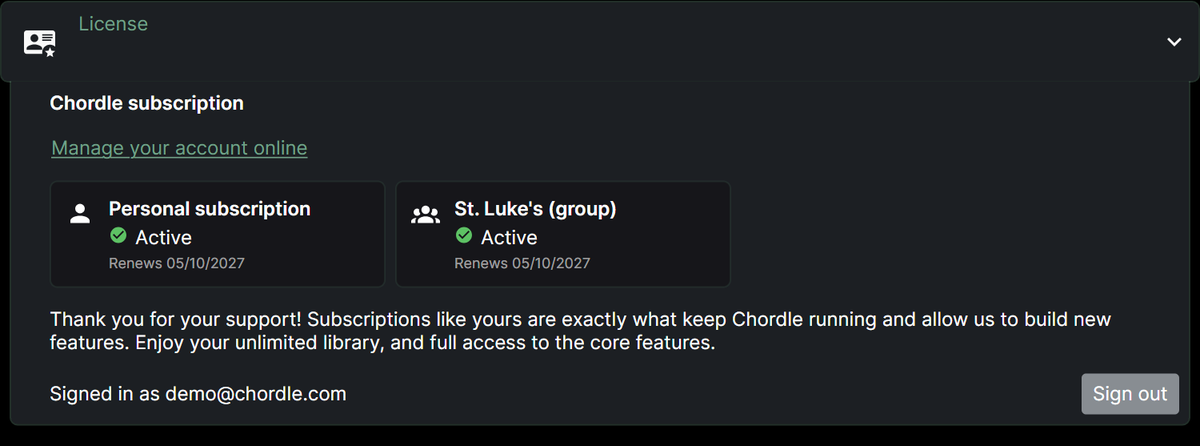
Open Settings > License and check which account the app is signed in with.
-
If it says Sign in, or shows a different email, sign in with the same provider (Google or Microsoft) and email you paid with, or used to join the group. A different sign-in is a different Chordle account.
-
If the right account is signed in but the subscription isn’t listed, sign in to your Chordle account on the website and check Plan and billing, or for a group, the group’s page.
Payments and billing
Payments for Chordle Personal and groups are handled by our payment provider, Lemon Squeezy, so your statement may show their name.
- Receipts, card details and cancelling: open Plan and billing in your Chordle account (or Billing & seats for a group) and choose Manage billing.
- If a payment fails, nothing stops straight away. Your account shows the date to update your card by, a week after the payment was due.
- Refunds: you can have a full refund within 14 days of any payment. Email info@chordle.com from the address on your Chordle account and tell us which payment.
See the FAQ for more.
Moving from a store subscription
Buying Chordle Personal doesn’t cancel a Microsoft Store or Google Play subscription, and you’ll be billed by both until you cancel the store one yourself. See moving from a store license.
Microsoft Store purchases
Windows and Android need separate store subscriptions: a purchase on one store won’t unlock the other.
First, make sure that you are signed in to the Microsoft Store with the same account you used to make the purchase. You can check which account made the purchase on your Microsoft Store account page.
If the purchase was successful, try tapping Restore subscription in the dialog that opens when you tap Subscribe to unlock.
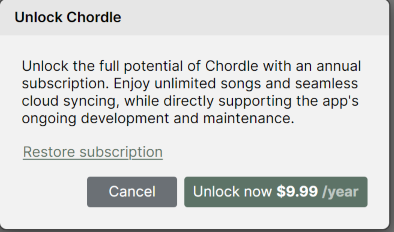
If that still doesn’t work, please contact Microsoft support for Store license issues.
Google Play purchases
Make sure you are signed in to Google Play with the same Google account you used to make the purchase. You can check your purchase in your Google Play order history.
If the purchase was successful, try tapping Restore subscription in the dialog that opens when you tap Subscribe to unlock.
If that still doesn’t work, please see fix problems with subscriptions or contact Google Play support for Play license issues.