
While a set list is playing, you can choose where it appears on screen. This lets you keep the set list beside your library so you can see what’s coming up while you browse, or tuck it along the bottom with the player controls.
Dock positions
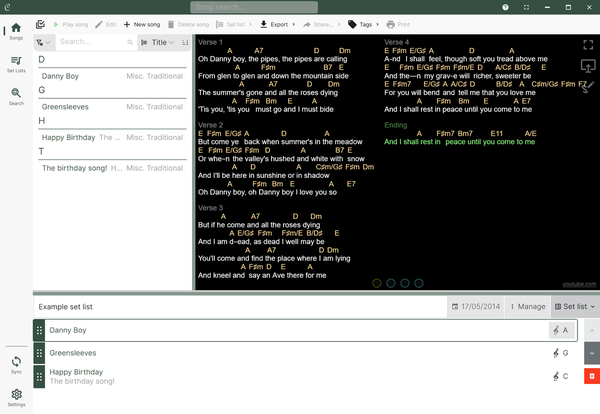
Bottom
The set list sits along the bottom of the screen with the player controls. A toggle button lets you expand and collapse it. This is the default.
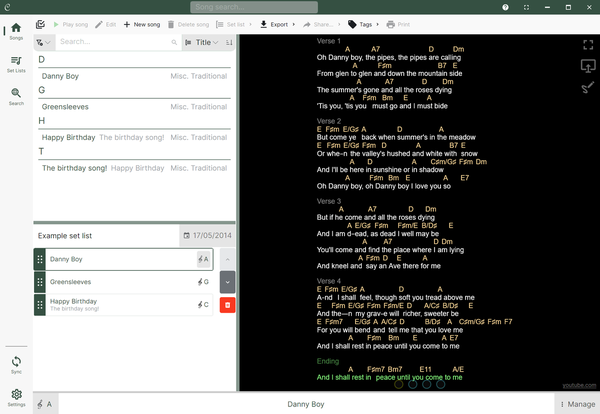
Left
The set list is docked to the left, underneath your library list. It’s always shown while a set list is playing - there’s no expand/collapse toggle.
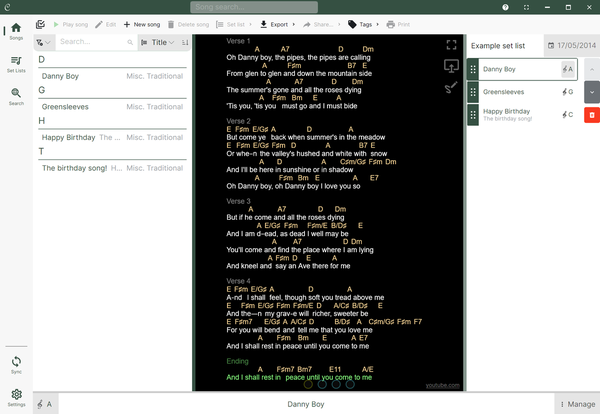
Right
The set list is docked to the right of the screen, beside all of the content. Like the left dock, it’s always shown while a set list is playing.
Changing the dock position
There are two ways to set where the set list docks:
- Default position - set it under Settings / Interface / Set list position. This is used for every set list you play.
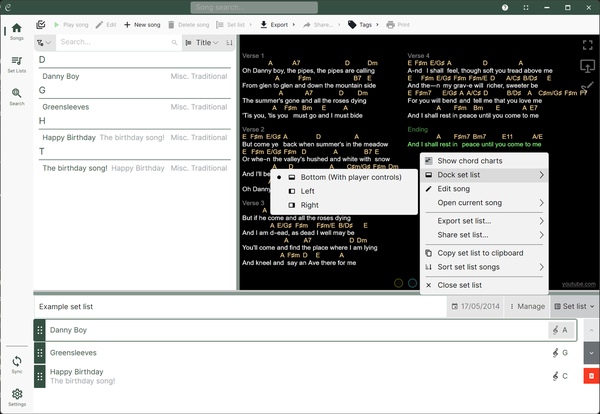
- While playing - open the Manage menu in the player controls and choose Dock set list to move it without leaving the current set list. See Current set list actions.
Docking and full screen
Going full screen hides the library and set list so the song fills the screen. How you bring the set list back depends on where it’s docked:
- Left or right - tapping the reveal button in the top left of the player brings the library back into view, and because the set list is docked beside it, the set list reappears too.
- Bottom - the set list comes back with the player controls. With a mouse, move to the bottom of the screen; on a touch screen, tap the bottom of the screen. Revealing the controls re-docks the player bar normally, so the bottom-docked set list reappears with it.