Chordle draws guitar tablature as a proper tab staff, rather than as a block of dashes and numbers. Each string gets its own line, fret numbers sit on top of the lines, and techniques such as hammer-ons and slides are drawn as symbols you can read at a glance.
Writing tablature
You write tablature the same way as you always have, using the usual text format with a line for each string. Chordle takes care of drawing it.
How you mark a block of text as tablature depends on the format you use to edit your songs:
- In Chords above text format, start a line with
[Tab]. The tab runs until the next blank line. You can add a title with[Tab label="Intro"]. You can also surround the tab with{sot}and{eot}lines. - In ChordPro format, use
{start_of_tab}and{end_of_tab}, or the short forms{sot}and{eot}.
For example:
[Tab label="Intro"]
    Em
e|--------7------|
B|------8---8----|
G|----9-------9--|
D|---------------|
A|--7------------|
E|---------------|
What Chordle draws
- String labels - the labels at the start of each line are shown exactly as you wrote them. This means alternate tunings such as Drop D or DADGAD, and four string bass, all look right. If you leave the labels off, Chordle numbers the strings instead, with the top line as the highest string.
- Fret numbers - numbers are drawn on top of the string lines, breaking the line so they are easy to read. Frets above 9, such as 12 or 14, are drawn as a single number.
- Bar lines - each
|in your tab becomes a vertical line across the staff. - A TAB label - a vertical TAB label is drawn at the left of every staff.
- Chord names - if the line directly above a staff contains chord names, such as
Emin the example above, they are drawn above the staff in your chord colour, positioned above the notes they were written over.
Techniques
Chordle recognises these symbols between and beside fret numbers:
| You write | Chordle draws |
|---|---|
h |
Hammer-on - an arc joining the two notes, labelled h |
p |
Pull-off - an arc joining the two notes, labelled p |
/ or s |
Slide up - a diagonal line |
\ |
Slide down - a diagonal line |
b |
Bend - a bend line, with the target fret if you give one (5b7). When Chordle can work out the size of the bend it is labelled above, for example full for a whole tone or ½ for a semitone |
r |
Release of a bend, for example 5b7r5 |
~ or v |
Vibrato - a wavy line |
t or T |
Tap - a T above the note |
x |
Muted note |
A complete example
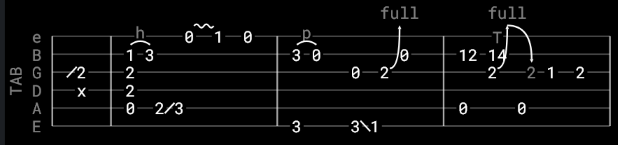
This is the tab shown at the top of the page, written in ChordPro format. It uses each of the techniques in the table above:
{sot}
Am       C        G                Am               E
e|-----|-------0~~1--0--|----------------|----------------|
B|-----|-1h3------------|-3p0--------0---|-12t14----------|
G|-/2--|-2--------------|-------0--2b4---|----2b4r2-1--2--|
D|--x--|-2--------------|----------------|----------------|
A|-----|-0--2/3---------|----------------|-0-----0--------|
E|-----|----------------|-3-----3\1------|----------------|
{eot}
Am C G Am Eon the line above is the chord names line.-/2on the G string is a slide up into the 2nd fret, and thexon the D string below it is a muted note.0~~1is a vibrato,1h3is a hammer-on and3p0is a pull-off.2/3and3\1are a slide up and a slide down.2b4bends the 2nd fret up to the pitch of the 4th, which Chordle labels as a full bend.2b4r2bends it up and releases it back down.12t14taps the 14th fret. The12and14are each drawn as a single number.
Transposing
Fret numbers are never changed when you change a song’s key, because they describe where your fingers go rather than which chords are being played. Chord names above a staff are transposed along with the rest of the song, so the two can differ if you move the key.
When Chordle can’t draw the staff
Chordle only draws a staff when it is confident that it has found one: at least four lines of tab that are roughly the same width. Anything else, such as notes about the tuning or a single line of tab, is shown as plain text, so you never lose content.
If a tab you have pasted in isn’t being drawn as a staff, check that each string is on its own line, with no blank lines between them.
See also
- Lyrics only - tablature is hidden when you choose Lyrics only in the song presentation settings.
- Colours - the tablature colour is part of your song colour theme.
- Word export - when you export to Word, each staff is included as a picture that looks the same as it does in Chordle. Turn off Draw grids and tablature as pictures in the export options if you would rather have editable text. Tablature is left out of Word exports when chords are turned off.